

kodosumi panel API
The purpose of this document is to demonstrate the interaction with kodosumi panel API. To run the example requests below ensure you have an agentic service Hymn Creator up and running on your localhost. See README on installation, setup and deployment of Ray, kodosumi and the Hymn Creator agentic service.
Authentication
Use the /login or /api/login endpoint to authenticate, retrieve an API key and a set of cookies for further API interaction. The default username and password is admin and admin. Endpoint /login authenticates with GET plus URL parameters. POST authenticates with URL-encoded form data (application/x-www-form-urlencoded). The API endpoint /api/login authenticates with POST and a JSON body (application/json).
import httpx

resp = httpx.post(
    "http://localhost:3370/login",
    data={
        "name": "admin",
        "password": "admin"
    }
)
api_key = resp.json().get("KODOSUMI_API_KEY")
cookies = resp.cookies
The corresponding request to /api/login is
httpx.post(
    "http://localhost:3370/api/login",
    json={
        "name": "admin",
        "password": "admin"
    }
)
Flow Control
Use the api_key or cookies with further requests. The following example retrieves the list of flows using api_key.
resp = httpx.get(
    "http://localhost:3370/flow",
    headers={"KODOSUMI_API_KEY": api_key})
resp.json()
The response is the first page of an offset paginated list of flows.
{'items': [{'author': '[email protected]',
            'deprecated': None,
            'description': 'This agent creates a short hymn about a given '
                           'topic of your choice using openai and crewai.',
            'method': 'GET',
            'organization': None,
            'source': 'http://localhost:8001/hymn/openapi.json',
            'summary': 'Hymn Creator',
            'tags': ['CrewAi', 'Test'],
            'uid': '48ff6c11855aceed7f16ab190328c53c',
            'url': '/-/localhost/8001/hymn/-/'}],
 'offset': None}
You can also simply use the cookies. This demo uses this approach.
resp = httpx.get("http://localhost:3370/flow", cookies=cookies)
resp.json()
Retrieve Inputs Scheme
Retrieve Hymn Creator input schema at GET /-/localhost/8001/hymn/- and launch flow execution with POST /-/localhost/8001/hymn/- and appropriate inputs data.
resp = httpx.get(
    "http://localhost:3370/-/localhost/8001/hymn/-", cookies=cookies)
resp.json()
The response contains the openapi.json fields for summary (title), description and tags. Some extra fields are in openapi_extra. Key elements delivers the list of inputs element.
{
    'summary': 'Hymn Creator',
    'description': 'This agent creates a short hymn about a given topic...',
    'tags': ['Test', 'CrewAi'],
    'openapi_extra': {
        'x-kodosumi': True,
        'x-author': '[email protected]',
        'x-version': '1.0.1'
    },
    'elements': [
        {
            'type': 'markdown',
            'text': '# Hymn Creator\nThis agent creates a short hymn...
        '},
        {
            'type': 'html',
            'text': '<div class="space"></div>'
        },
        {
            'type': 'text',
            'name': 'topic',
            'label': 'Topic',
            'value': 'A Du Du Du and A Da Da Da.',
            'required': False,
            'placeholder': None,
            'size': None,
            'pattern': None
        },
        {
            'type': 'submit',
            'text': 'Submit'
        },
        {
            'type': 'cancel',
            'text': 'Cancel'
        }
    ]
}
Launch
kodosumi rendering engine translates all inputs elements into a form to post and trigger flow execution at http://localhost:3370/inputs/-/localhost/8001/hymn/-/.
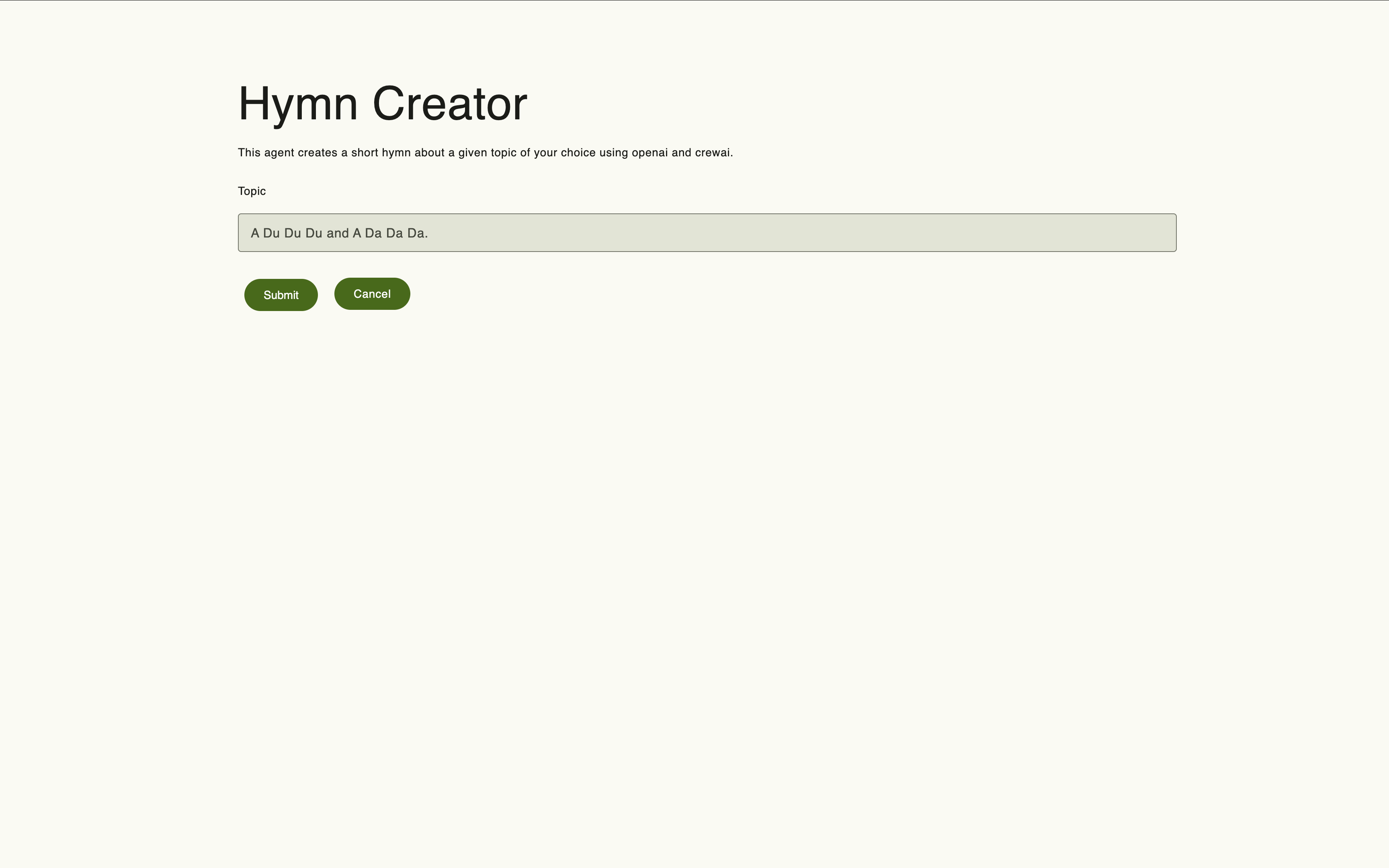
To directly POST follow the inputs scheme as in example:
resp = httpx.post(
    "http://localhost:3370/-/localhost/8001/hymn/-/",
    cookies=cookies,
    json={
        "topic": "Ich wollte ich wäre ein Huhn."
    }
)
In case of success the result contains the fid (flow identifier). Use this fid for further requests.
fid = resp.json().get("result")Error Handling
In case of failure the result is empty. The response has errors as a key/value pair with error information.
resp = httpx.post(
    "http://localhost:3370/-/localhost/8001/hymn/-/",
    cookies=cookies,
    json={"topic": ""})  # not accepted !
assert resp.status_code == 200
assert resp.json().get("result") is None
Example error output on empty topic:
{
    'errors': {
        'topic': ['Please give me a topic.'],
        '_global_': []
    },
    elements: ...
}
Execution Control
Request and poll for status updates at /outputs/status.
resp = httpx.get(
    f"http://localhost:3370/outputs/status/{fid}",
    cookies=cookies)
resp.json()
The result after starting but some time before finish looks similar to:
{
    'status': 'running',
    'timestamp': 1747813976.091786,
    'final': None,
    'fid': '682d86536dd659324a5c8901',
    'summary': 'Hymn Creator',
    'description': 'This agent creates a short hymn about a given topic...',
    'tags': ['Test', 'CrewAi'],
    'deprecated': None,
    'author': '[email protected]',
    'organization': None,
    'version': '1.0.1',
    'kodosumi_version': None,
    'base_url': '/-/localhost/8001/hymn/-/',
    'entry_point': 'hymn.app:crew',
    'username': '35a04fc4-4442-4b24-b109-614b45d52de1'
}
After completion the status request contains the final result in the final field. Note: The final field is populated for both successful completions (status == "finished") and errors (status == "error"). For errors, it contains the serialized error message as Text.
{
   'status': 'finished',
   'timestamp': 1747813996.8025322,
   'final': '{"CrewOutput":{"raw":"**Hymn Title: \\"Ich wollte ich wäre ein...',
   'fid': '682d86536dd659324a5c8901',
   'summary': 'Hymn Creator',
   'description': 'This agent creates a short hymn about a given topic...',
   'tags': ['Test', 'CrewAi'],
   'deprecated': None,
   'author': '[email protected]',
   'organization': None,
   'version': '1.0.1',
   'kodosumi_version': None,
   'base_url': '/-/localhost/8001/hymn/-/',
   'entry_point': 'hymn.app:crew',
   'username': '35a04fc4-4442-4b24-b109-614b45d52de1'
Output formats
The final field is a JSON-encoded string. Its content depends on the return type of the agentic service. The outer key identifies the output type. Below are examples showing what the decoded final value looks like for each supported output type.
Link output — when the service returns a Link pointing to an external URL:
# Decoded value of final field
{
    "Link": {
        "url": "https://example.com/result",
        "title": "Result Page"
    }
}
Image output — when the service returns an Image resource:
# Decoded value of final field
{
    "Image": {
        "url": "https://example.com/output.png",
        "alt": "Generated image"
    }
}
Video output — when the service returns a Video resource:
# Decoded value of final field
{
    "Video": {
        "url": "https://example.com/output.mp4"
    }
}
As a reminder, the Text type appears for plain-text results and for serialized error messages (when status == "error"):
# Decoded value of final field (Text or error)
{
    "Text": {
        "body": "Processing completed successfully."
    }
}
Since the plain /status request might fail due to Ray latencies you should harden the intial request past flow launch with ?extended=true as in the following example:
resp = httpx.get(
    f"http://localhost:3370/outputs/status/{fid}?extended=true",
    cookies=cookies)
resp.json()
The complete event stream is available at /outputs/stream.
with httpx.stream("GET", f"http://localhost:3370/outputs/stream/{fid}", cookies=cookies) as r:
    for text in r.iter_text():
        print(text)
Runtime Error Handling
During flow execution, errors may occur that raise kodosumi.error.KodosumiError. Important: Only kodosumi.error.KodosumiError exceptions are handled and exposed through the API. All other exceptions are silently ignored and will not appear in the status or results endpoints.
When a kodosumi.error.KodosumiError is raised, the flow status changes to "error" and the error message is made available through the status endpoint's final field (as serialized Text) as well as the results endpoints.
Error Status
When a flow execution encounters a kodosumi.error.KodosumiError, the status endpoint returns status == "error":
resp = httpx.get(
    f"http://localhost:3370/outputs/status/{fid}",
    cookies=cookies)
result = resp.json()
assert result["status"] == "error"
Example response when an error occurs:
{
   'status': 'error',
   'timestamp': 1747813996.8025322,
   'final': '{"Text":{"body":"Error message here"}}',
   'fid': '682d86536dd659324a5c8901',
   'summary': 'Hymn Creator',
   'description': 'This agent creates a short hymn about a given topic...',
   'tags': ['Test', 'CrewAi'],
   'deprecated': None,
   'author': '[email protected]',
   'organization': None,
   'version': '1.0.1',
   'kodosumi_version': None,
   'base_url': '/-/localhost/8001/hymn/-/',
   'entry_point': 'hymn.app:crew',
   'username': '35a04fc4-4442-4b24-b109-614b45d52de1'
}
Error Message Retrieval
The error message is available through the results endpoints GET /outputs/raw/{fid} and GET /outputs/html/{fid}. The error message is returned as Text (not Markdown):
# Get raw error message
resp = httpx.get(
    f"http://localhost:3370/outputs/raw/{fid}",
    cookies=cookies)
error_message = resp.text  # Text formatted error message

# Get HTML rendered error message
resp = httpx.get(
    f"http://localhost:3370/outputs/html/{fid}",
    cookies=cookies)
error_html = resp.text  # HTML rendered error message
The error message contains the exception details from kodosumi.error.KodosumiError and is formatted as plain text (dtypes.Text), making it suitable for display in user interfaces.